
Every character.
A clearer overview.
Keep resource pools separate, check daily and weekly activities, and spot capacity warnings across your characters.
Resources · Activities · Recovery estimates
 AION 2 COMPANION
← All apps
AION 2 · WINDOWS COMPANION
Keep your characters, resources and next adventure in view. A little less keeping track. A little more Atreia.
A LOOK INSIDE
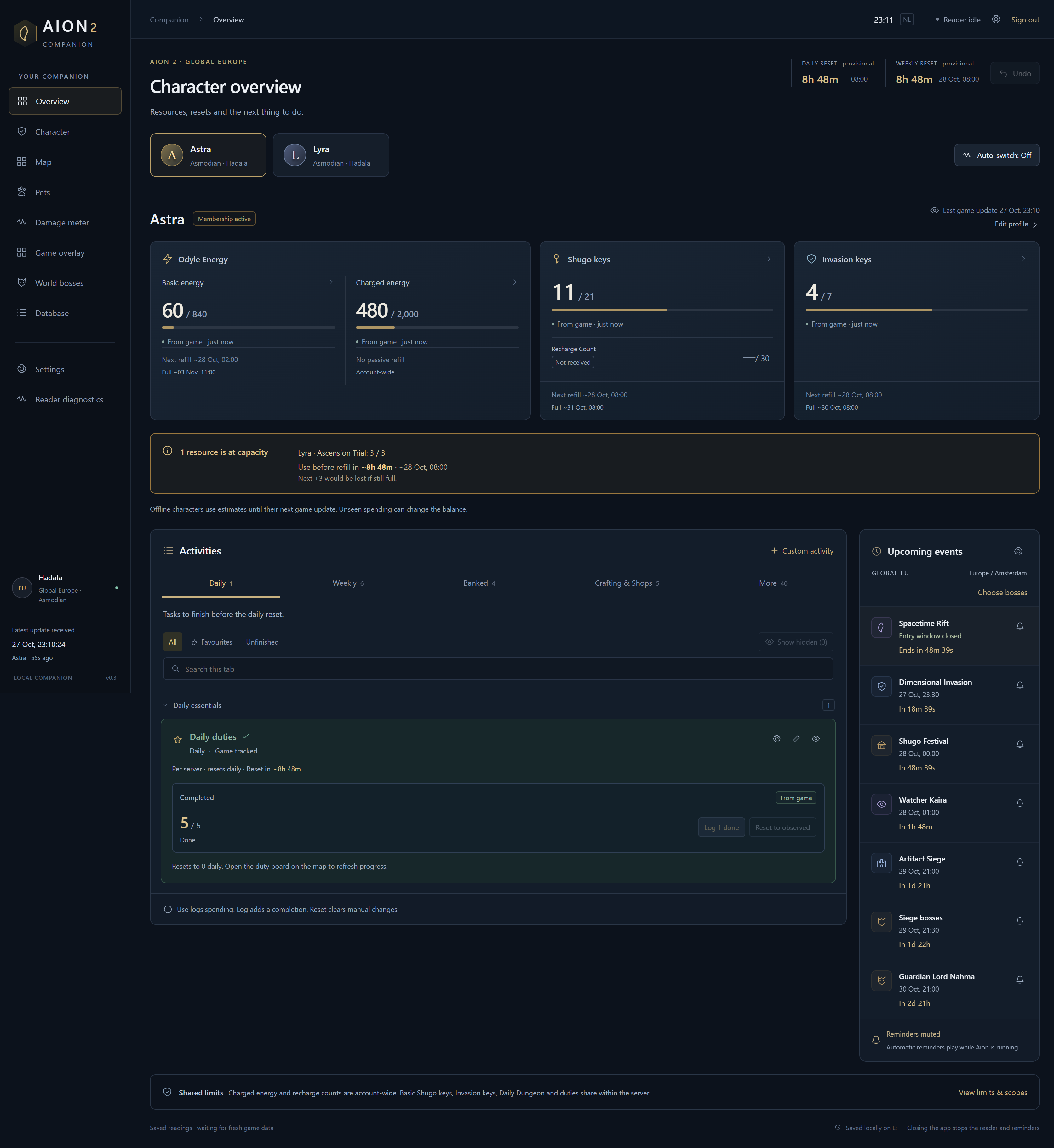
Separate character balances, daily and weekly activities, capacity warnings and upcoming events.
Development screenshots with sample character names. Saved readings and test states shown here are examples, not a live connection to your game. Screens may change before release.
LESS TO REMEMBER
From the next reset
to the next farming spot.
Keep resource pools separate, check daily and weekly activities, and spot capacity warnings across your characters.
Explore reference map layers, save pins and plan straight-line routes. Find pet farming areas alongside your collection.
Arrange overlay widgets for windowed or borderless play, and choose event reminders with your own sound and lead time.
NEW IN DEVELOPMENT
Browse a rolling fight history, mark fights to Keep, and choose automatic saving for the content or bosses you care about.
Plan five preferred Genus boards with nine fixed line positions. Choose eligible stats and rank your priorities, then save your targets for reference.
Track supported crafting allowances and merchant purchases alongside your activities. Game readings, manual entries and reset estimates stay clearly distinguished.
These additions are part of the desktop app in development. The gallery above shows earlier screens. Genus boards record your targets, not live rolled stats; automatic tracking covers supported game readings only.
TRY A SMALL PIECE
Switch characters and check off a task. This browser demo uses sample data, so you can explore without connecting anything.
THE NEXT CHAPTER
This will be the place to get the Windows app. For now, explore the preview while we prepare the installation experience.
No public installer available yet.
Check back here for release details.
BEFORE YOU DIVE IN
A public installer is not available yet. This site is an early look at the app. When installation is ready, the Windows download and setup instructions will appear here.
The gallery shows actual development screenshots. The small interactive overview is a separate demo with sample data. The companion itself is a Windows desktop app.
Game reader coverage is partial. The desktop app distinguishes game observations, manual entries and estimates. Offline recovery is an estimate until fresh game data arrives; unseen spending can change the result.
The desktop app must remain open, including minimised, for its reader and reminders to run. Closing it stops them. The website preview does not run game reminders.
No. Beacon is an independent project and is not affiliated with or endorsed by NCSOFT. AION and associated game artwork belong to their respective owners.